
The Project Standard: pyproject.toml
Last updated on 2026-02-11 | Edit this page
Estimated time: 30 minutes
Overview
Questions
- How do I turn my folder of code into an installable library?
- What is
pyproject.tomland why is it the standard? - How does
uvsimplify project management? - Why use the
srclayout?
Objectives
- Use
uv initto generate a standardpyproject.toml(PEP 621). - Organize code using the
srclayout to prevent import errors. - Manage dependencies and lockfiles using
uv add. - Run code in an isolated environment using
uv run.
The Installation Problem
In the previous episode, we hit a wall: our chemlib package only worked when the interpreter
starts from the project folder. To fix this, we need to
Install the package into our Python environment.
As far as Python is concerned, an “installation” involves placing the
files somewhere the interpreter will find them. One of the simplest ways
involves setting the PYTHONPATH terminal
variable.
An annotated timeline of tooling:
- 2003
- PEP 301 defines PyPI
- 2004
-
setuptoolsdeclares dependencies - 2005
- packages are hosted on PyPI
- 2007
-
virtualenvis released to support multiple Python versions - 2008
-
pipis released for better dependency management - 2012
- multi-language distribution discussions from PEP 425 and PEP 427 1
- 2013
-
PEP 427 standardizes the
wheelformat, replacing eggs - 2016
-
PEP 518 introduces
pyproject.tomlto specify build dependencies 2 - 2017
-
PEP 517 separates the
build frontend (
pip) from the backend (flit,hatch,poetry) - 2020
-
PEP 621 standardizes
project metadata in
pyproject.toml, removing the need forsetup.pyconfiguration - 2022
- PEP 668 marks system Python environments as “externally managed” to prevent accidental breakage
- 2021
- PEP 665 attempts (and fails) to standardize lockfiles. 3
- 2024
- PEP 723 enables inline script metadata. 4
- 2024
-
PEP 735 introduces
dependency groups (e.g., separating
testorlintdependencies) without requiring a package build. - 2025
-
PEP 751 formalizes the
pylock.tomlfile.
Enter uv
Sometime in the early 2020s Python projects began adopting a Rust
core. Starting with ruff and moving up to
uv and pixi
in the past few years, these tools are often able cache aggressively,
and provide saner resolution of versions and other requirements for
packaging.
We will use uv, a convenient, modern Python package
manager, which also doubles as a
frontend, replacing pip with uv pip and a backend for pure Python
distributions.
Initializing a Project
Let’s turn our chemlib folder into a
proper project. We will use uv init to
generate the configuration.
BASH
# First, ensure we are in the project root
cd project_folder

# Initialize a library project
uv init --lib --name chemlib
This creates a `pyproject.toml` file. Let’s inspect it.
SH
[project]
name = "chemlib"
version = "0.1.0"
description = "Add your description here"
readme = "README.md"
authors = [
    { name = "Rohit Goswami", email = "rohit.goswami@epfl.ch" }
]
requires-python = ">=3.12"
dependencies = []

[build-system]
requires = ["uv_build>=0.9.26,<0.10.0"]
build-backend = "uv_build"
Breakdown
[project]- This table is standardized by PEP 621. It defines what your package is (name, version, dependencies).
[build-system]-
This defines how to build it, with an appropriate
build backend.
uvdefaults touv_build5.
The Python Packaging User Guide provides
a complete description of the fields in the pyproject.toml.
The src Layout
uv init --lib automatically sets up the
src
layout for us 6. Your folder structure should now look like
this:
project_folder/
├── pyproject.toml
├── src/
│   └── chemlib/
│       ├── __init__.py
│       └── py.typed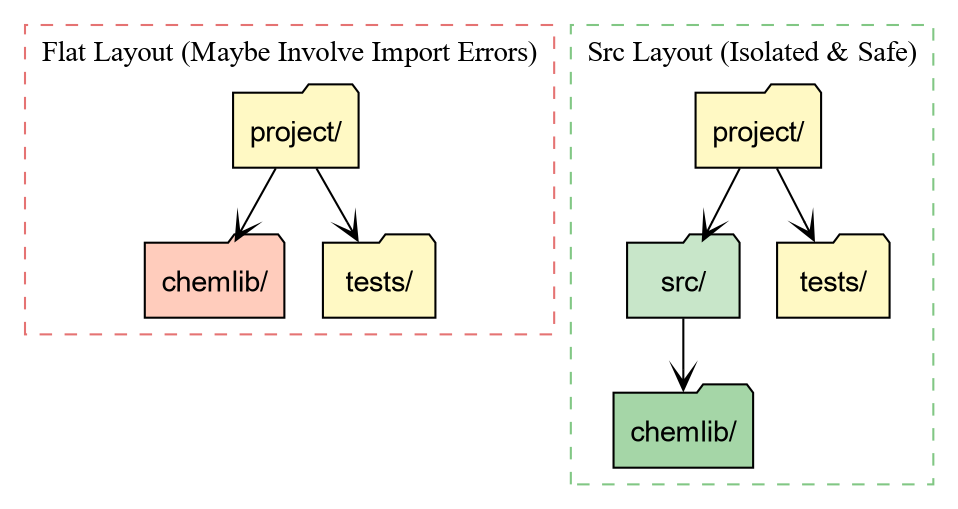
Why the src directory?
-
Testing against the installed package: With a flat
layout (package in root), running
pytestoften imports the local folder instead of the installed package. This hides installation bugs (like missing data files). -
Cleaner root: Your root directory defines the
project (config, docs, scripts), while
srcholds the product (the source code).
Managing Dependencies
In the first episode, we saw how numpy
caused crashes when not part of the environment. Let’s add numpy to our project properly.
BASH
uv add numpy
Using CPython 3.11.14
Creating virtual environment at: .venv
Resolved 2 packages in 120ms
      Built chemlib @ file:///home/goswami/blah
Prepared 2 packages in 414ms
Installed 2 packages in 20ms
 + chemlib==0.1.0 (from file:///home/goswami/blah)
 + numpy==2.4.2
This performs two critical actions:
- It adds
"numpy"to thedependencieslist inpyproject.toml. - It creates a
uv.lockfile.
The Lockfile: This file records the
exact version of numpy (e.g., 2.1.0) and every underlying dependency
installed. This guarantees that your teammates (and your future self)
get the exact same environment.
Running Code with implicit virtual environments
You might notice that uv didn’t ask you
to activate a virtual environment. It manages one for you
automatically.
To run code in this project’s environment, we use uv run.
.../project_folder/.venv/lib/python3.12/site-packages/chemlib/__init__.pyNotice the path! Python is loading chemlib from .venv/lib/.../site-packages. This means uv has performed an Editable
Install.
- We can edit
src/chemlib/geometry.py. - The changes appear immediately in the installed package.
- But Python treats it as a properly installed library.
Challenge: Update the Geometry Module
Now that numpy is installed, modify
src/chemlib/geometry.py to use it.
Remember to expose the functionality within __init__.py as in the previous lesson.
- Import
numpy. - Change
center_of_massto accept a list of positions and return the mean position usingnp.mean.
PYTHON
# src/chemlib/geometry.py
import numpy as np

def center_of_mass(atoms):
    print("Calculating Center of Mass with NumPy...")
    # Assume atoms is a list of [x, y, z] coordinates
    data = np.array(atoms)
    # Calculate mean along axis 0 (rows)
    com = np.mean(data, axis=0)
    return com
Test it using uv run:
Output:
Calculating Center of Mass with NumPy...
[1. 1. 1.]
Dependency Resolution and Conflicts
A robust package manager must handle Constraint Satisfaction Problems. You might require Library A, which relies on Library C (v1.0), while simultaneously requiring Library B, which relies on Library C (v2.0).
If these version requirements do not overlap, a conflict arises.
uv detects these impossible states before
modifying the environment.
Let us artificially construct a conflict using pydantic, a data validation library often used
alongside scientific tools.
Challenge: Inducing a Conflict
We will attempt to install incompatible versions of pydantic and pydantic-settings 7.
- Request an older version of
pydantic(<2.0). - Request a newer version of
pydantic-settings(>=2.0), which technically depends on Pydantic 2.0+.
The output should resemble:
× No solution found when resolving dependencies:
╰─▶ Because only the following versions of pydantic-settings are available:
        pydantic-settings<=2.0.0
        ...
    and pydantic-settings==2.0.0 depends on pydantic>=2.0b3, we can conclude that
    pydantic-settings>=2.0.0,<2.0.1 depends on pydantic>=2.0b3.
    And because pydantic-settings>=2.0.1,<=2.0.3 depends on pydantic>=2.0.1, we can conclude that
    pydantic-settings>=2.0.0,<2.1.0 depends on pydantic>=2.0b3.
    And because pydantic-settings>=2.1.0,<=2.2.1 depends on pydantic>=2.3.0 and pydantic>=2.7.0, we
    can conclude that pydantic-settings>=2.0.0 depends on pydantic>=2.0b3.
    And because your project depends on pydantic<2 and pydantic-settings>=2, we can conclude that
    your project's requirements are unsatisfiable.
help: If you want to add the package regardless of the failed resolution, provide the `--frozen` flag
      to skip locking and syncing.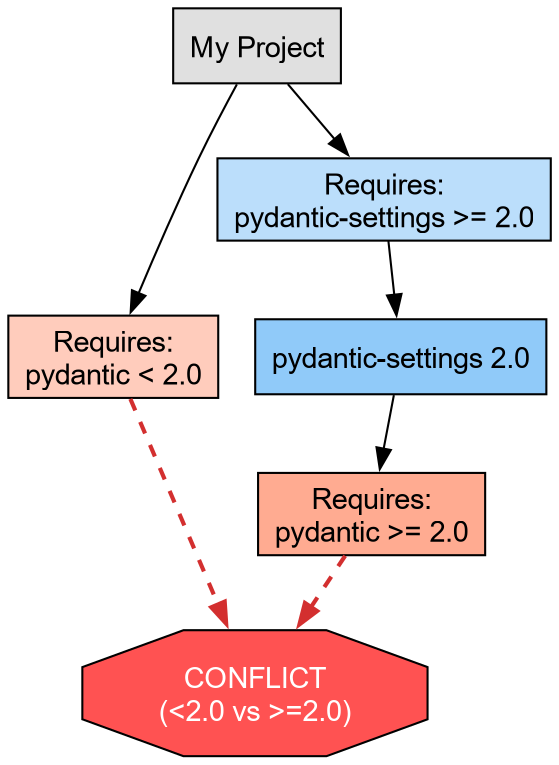
This failure protects the development environment. uv refuses to install a broken state.
Abstract vs. Concrete Dependencies
We now resolve the conflict by allowing the solver to select the latest compatible versions (removing the manual version pins).
This brings us to a critical distinction in Python packaging:
-
Abstract Dependencies (
pyproject.toml): These define the minimum requirements for the project. For a library likechemlib, we prefer loose constraints (e.g.,metatrain>=0.1.0) to maximize compatibility with other packages. -
Concrete Dependencies (
uv.lock): This file records the exact resolution (e.g.,metatrain==0.1.5,torch==2.1.0) used in development. It ensures reproducibility.
The lockfile guarantees that all developers operate on an identical atomic substrate, eliminating the “works on my machine” class of defects.
- pyproject.toml is the standard recipe for Python projects (PEP 621).
- uv add manages dependencies and ensures reproducibility via uv.lock.
- uv run executes code in an isolated, editable environment without manual activation.
-
Isolation:
uvenforces a clean environment, preventing accidental usage of unlisted packages. -
Manifest vs. Lock:
pyproject.tomldeclares what we need;uv.lockrecords exactly what we installed.
condaarrives here↩︎This solves the “chicken and egg” problem of needing tools to install tools↩︎
A universal lockfile standard remains elusive; tools like
pdmandpoetrystart providing specific implementations.↩︎Allows single-file scripts to declare their own dependencies.↩︎
For compiled code, this will need to be switched out with
meson-python,setuptools, orscikit-buildto handle C++/Fortran code.↩︎the flat layout has some drawbacks related to testing, though the Hitchhiker’s guide disagrees↩︎
adapted from the
uvPyCon 2025 tutorial↩︎