
Modules, Packages, and The Search Path
Last updated on 2026-02-11 | Edit this page
Estimated time: 20 minutes
Overview
Questions
- How does Python know where to find the libraries you import?
- What distinguishes a python “script” from a python “package”?
- What is an
__init__.pyfile?
Objectives
- Inspect the
sys.pathvariable to understand import resolution. - Differentiate between built-in modules, installed packages, and local code.
- Create a minimal local package structure.
From Scripts to Reusable Code
You have likely written Python scripts before: single files ending in
.py that perform a specific analysis or
task. While scripts are excellent for execution
(running a calculation once), they are often poor at facilitating
reuse.
Imagine you wrote a useful function to calculate the center of mass
of a molecule in analysis.py. A month
later, you start a new project and need that same function. You have two
options:
-
Copy and Paste: You copy the function into your new
script.
- Problem: If you find a bug in the original function, you have to remember to fix it in every copy you made.
- Importing: You tell Python to load the code from the original file.
Option 2 is the foundation of Python packaging. To do this effectively, we must first understand how Python finds the code you ask for.
How Python Finds Code
When you type import numpy, Python does
not magically know where that code lives. It follows a deterministic
search procedure. We can see this procedure in action using the built-in
sys module.
PYTHON
['',
 '/usr/lib/python314.zip',
 '/usr/lib/python3.14',
 '/usr/lib/python3.14/lib-dynload',
 '/usr/lib/python3.14/site-packages']
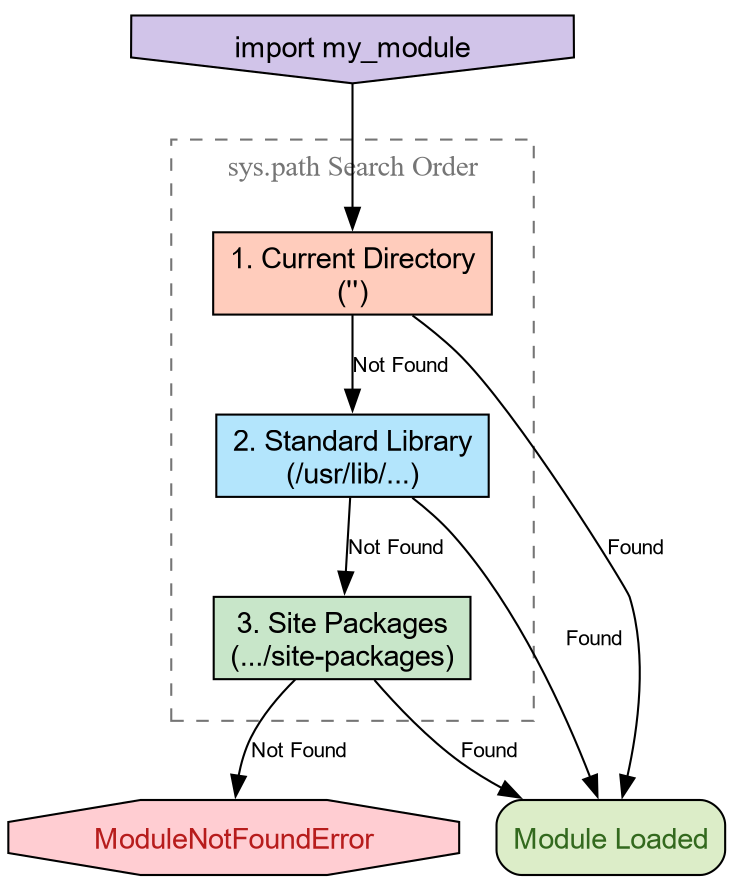
The variable sys.path is a list of
directory strings. When you import a module, Python scans these
directories in order. The first match wins.
-
The Empty String (’’): This represents the
current working directory. This is why you can always
import a
helper.pyfile if it is sitting right next to your script. -
Standard Library: Locations like
/usr/lib/python3.*contain built-ins likeos,math, andpathlib. -
Site Packages: Directories like
site-packagesordist-packagesare where tools likepip,conda, orpixiplace third-party libraries.
Python will import your local file instead of the
standard library math module.
Why? Because the current working directory
(represented by '' in sys.path) is usually at the top of the list. It
finds your math.py before scanning the
standard library paths. This is called “Shadowing” and is a common
source of bugs!
The Anatomy of a Package
- A Module
-
Is simply a single file ending in
.py. - A Package
-
Is a directory containing modules and a special file:
__init__.py.
Let’s create a very simple local package to handle some basic
chemistry geometry. We will call it chemlib.
Now, create a module inside this directory called geometry.py:
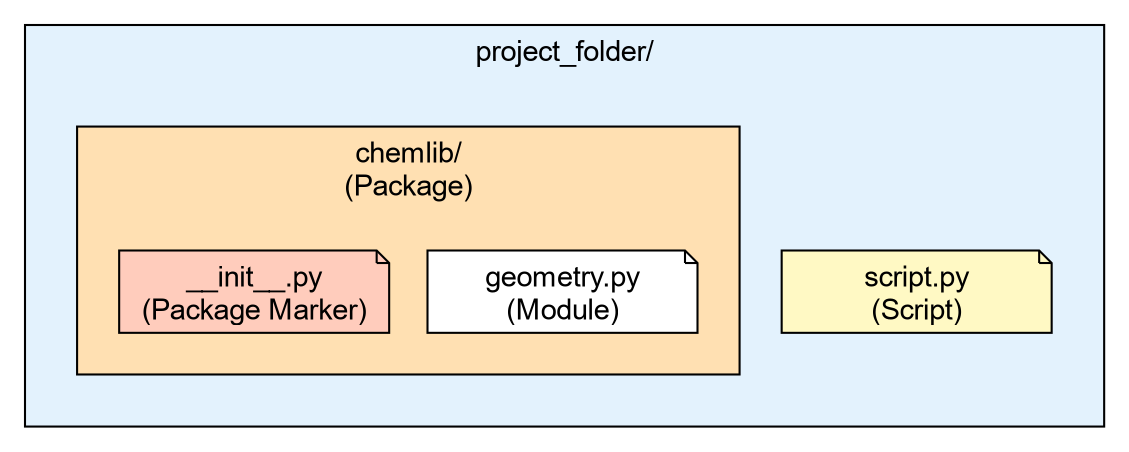
Your directory structure should look like this:
project_folder/
├── script.py
└── chemlib/
    ├── __init__.py
    └── geometry.py
The Role of __init__.py
The __init__.py file tells Python:
“Treat this directory as a package.” It is the first file executed when
you import the package. It can be empty, but it is often used to expose
functions to the top level.
Open chemlib/__init__.py and add:
Now, from the project_folder (the
parent directory), launch Python:
Loading chemlib package...
Calculating Center of Mass...
[0.0, 0.0, 0.0]
The “It Works on My Machine” Problem
We have created a package, but it is fragile. It relies entirely on
the Current Working Directory being in sys.path.
Challenge: Moving Directories
- Exit your python session.
- Change your directory to go one level up (outside your project
folder):
cd .. - Start Python and try to run
import chemlib.
What happens and why?
Output:
ModuleNotFoundError: No module named 'chemlib'Reason: You moved out of the folder containing chemlib. Since the package is not installed in
the global site-packages, and the current
directory no longer contains it, Python’s search through sys.path fails to find it.
To solve this, we need a standard way to tell Python “This package exists, please add it to your search path permanently.” This is the job of Packaging and Installation.
-
sys.pathis the list of directories Python searches for imports. - The order of search is: Current Directory -> Standard Library -> Installed Packages.
- A Package is a directory containing an
__init__.pyfile. - The
__init__.pyfile is the first file loaded whenimport PKGis run. - Code that works locally because of the current directory will fail when shared unless properly installed.