
Writing Reproducible Python
Last updated on 2026-02-12 | Edit this page
Overview
Questions
- What is the difference between the standard library and third-party packages?
- How do I share a script so that it runs on someone else’s computer?
Objectives
- Import and use the
pathlibstandard library. - Identify when a script requires external dependencies (like
numpy). - Write a self-contained script that declares its own dependencies using inline metadata.
- Share a script which reproducibly handles
condadependencies alongside Python.
The Humble Script
Most research software starts as a single file. You have some data, you need to analyze it, and you write a sequence of commands to get the job done.
Let’s start by creating a script that generates some data and saves
it. We will use the standard library module pathlib to handle file paths safely across
operating systems (Windows/macOS/Linux).
PYTHON
import random
from pathlib import Path

# Define output directory
DATA_DIR = Path("data")
DATA_DIR.mkdir(exist_ok=True)

def generate_trajectory(n_steps=100):
    print(f"Generating trajectory with {n_steps} steps...")
    path = [0.0]
    for _ in range(n_steps):
        # Random walk step
        step = random.uniform(-0.5, 0.5)
        path.append(path[-1] + step)
    return path

if __name__ == "__main__":
    traj = generate_trajectory()
    output_file = DATA_DIR / "trajectory.txt"

    with open(output_file, "w") as f:
        for point in traj:
            f.write(f"{point}\n")

print(f"Saved to {output_file}")This script uses only Built-in modules (random, pathlib).
You can send this file to anyone with Python installed, and it will
run.
The Need for External Libraries
Standard Python is powerful, but for scientific work, we almost
always need the “Scientific Stack”: numpy,
pandas/polars, or matplotlib.
Let’s modify our script to calculate statistics using numpy.
PYTHON
import random
from pathlib import Path
import numpy as np # new dependency!!

DATA_DIR = Path("data")
DATA_DIR.mkdir(exist_ok=True)

def generate_trajectory(n_steps=100):
    # Use numpy for efficient array generation
    steps = np.random.uniform(-0.5, 0.5, n_steps)
    trajectory = np.cumsum(steps)
    return trajectory

if __name__ == "__main__":
    traj = generate_trajectory()
    print(f"Mean position: {np.mean(traj):.4f}")
print(f"Std Dev: {np.std(traj):.4f}")The Dependency Problem
If you send this updated file to a colleague who just installed Python, what happens when they run it?
The Modern Solution: PEP 723 Metadata
Traditionally, you would send a requirements.txt file alongside your script, or
leave comments in the script, or try to add documentation in an
email.
But files get separated, and versions get desynchronized.
PEP
723 is a Python standard that allows you to embed
dependency information directly into the script file. Tools like uv (a fast Python package manager) can read this
header and automatically set up the environment for you.

We can add a special comment block at the top of our script:
PYTHON
# /// script
# requires-python = ">=3.11"
# dependencies = [
#     "numpy",
# ]
# ///

import numpy as np

print("Hello I don't crash anymore..")
# ... rest of script ...
Now, instead of manually installing numpy, you run the script using uv:
When you run this command:
-
uvreads the metadata block. - It creates a temporary, isolated virtual environment.
- It installs the specified version of
numpy. - It executes the script.
This guarantees that anyone with uv
installed can run your script immediately, without messing up their own
python environments.
Beyond Python: The pixibang
PEP 723 is fantastic for installable Python packages [fn:: most often this means things you can find on PyPI).
However, for scientific software, we often rely on compiled binaries
and libraries that are not Python packages—things like LAMMPS, GROMACS,
or eOn a server-client
tool for exploring the potential energy surfaces of atomistic
systems.
If your script needs to run a C++ binary, pip and uv cannot
help you easily. This is where pixi comes in.
pixi is a package manager
built on the conda ecosystem. It can
install Python packages and compiled binaries. We can
use a “pixibang”
script to effectively replicate the PEP 723 experience, but for the
entire system stack.
Example: Running minimizations with eOn and PET-MAD
Let’s write a script that drives a geometry minimization 1. This requires:
- Metatrain/Torch
- For the machine learning potential.
- rgpycrumbs
- For helper utilities.
- eOn Client
- The compiled C++ binary that actually performs the minimization.
First, we need to create the input geometry file pos.con in our directory:
BASH
cat << 'EOF' > pos.con
Generated by ASE
preBox_header_2
25.00   25.00   25.00
90.00   90.00   90.00
postBox_header_1
postBox_header_2
4
2 1 2 4
12.01 16.00 14.01 1.01
C
Coordinates of Component 1
  11.04   11.77   12.50 0    0
  12.03   10.88   12.50 0    1
O
Coordinates of Component 2
  14.41   13.15   12.44 0    2
N
Coordinates of Component 3
  13.44   13.86   12.46 0    3
  12.50   14.51   12.49 0    4
H
Coordinates of Component 4
  10.64   12.19   13.43 0    5
  10.59   12.14   11.58 0    6
  12.49   10.52   13.42 0    7
  12.45   10.49   11.57 0    8
EOF
Now, create the script eon_min.py. Note
the shebang line, and the use of a git
revision!
PYTHON
#!/usr/bin/env -S pixi exec --spec eon --spec uv -- uv run
# /// script
# requires-python = ">=3.11"
# dependencies = [
#     "ase",
#     "metatrain @ git+https://github.com/metatensor/metatrain@492f0bfaeb3ea72fda4252b0dd6c055363cf199a",
#     "rgpycrumbs",
# ]
# ///

from pathlib import Path
import subprocess

from rgpycrumbs.eon.helpers import write_eon_config
from rgpycrumbs.run.jupyter import run_command_or_exit

repo_id = "lab-cosmo/upet"
tag = "v1.1.0"
url_path = f"models/pet-mad-s-{tag}.ckpt"
fname = Path(url_path.replace(".ckpt", ".pt"))
fname.parent.mkdir(parents=True, exist_ok=True)
subprocess.run(
    [
        "mtt",
        "export",
        repo_id,
        url_path,
        "-o",
        fname,
    ],
    check=True,
)
print(f"Successfully exported {fname}.")

min_settings = {
    "Main": {"job": "minimization", "random_seed": 706253457},
    "Potential": {"potential": "Metatomic"},
    "Metatomic": {"model_path": fname.absolute()},
    "Optimizer": {
        "max_iterations": 2000,
        "opt_method": "lbfgs",
        "max_move": 0.5,
        "converged_force": 0.01,
    },
}

write_eon_config(".", min_settings)
run_command_or_exit(["eonclient"], capture=True, timeout=300)
Make it executable and run it:
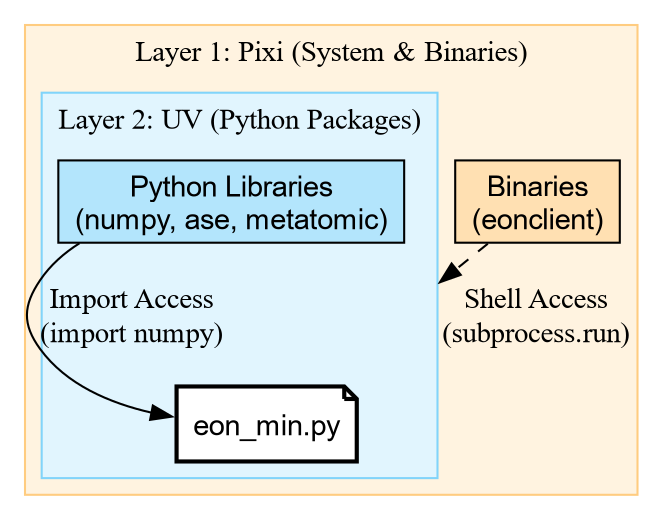
Unpacking the Shebang
The magic happens in this line: #!/usr/bin/env -S pixi exec --spec eon --spec uv -- uv run
This is a chain of tools:
-
pixi exec: Create an environment with
pixi. -
–spec eon: Explicitly request the
eonpackage (which contains the binaryeonclient). -
–spec uv: Explicitly request
uv. -
– uv run: Once the outer environment exists with
eOnanduv, it hands control over touv run. -
PEP 723:
uv runreads the script comments and installs the Python libraries (ase,rgpycrumbs).
This gives us the best of both worlds: pixi provides the
compiled binaries, and uv handles the fast Python
resolution.
The Result
When executed, the script downloads the model, exports it using metatrain, configures eOn, and runs the
binary.
[INFO] - Using best model from epoch None
[INFO] - Model exported to '.../models/pet-mad-s-v1.1.0.pt'
Successfully exported models/pet-mad-s-v1.1.0.pt.
Wrote eOn config to 'config.ini'
EON Client
VERSION: 01e09a5
...
[Matter]          0     0.00000e+00         1.30863e+00      -53.90300
[Matter]          1     1.46767e-02         6.40732e-01      -53.91548
...
[Matter]         51     1.56025e-03         9.85039e-03      -54.04262
Minimization converged within tolerence
Saving result to min.con
Final Energy: -54.04261779785156Challenge: The Pure Python Minimization
Create a script named ase_min.py that
performs the exact same minimization on pos.con, but uses the atomic simulation environment (ASE)
built-in LBFGS optimizer instead of
eOn.
Hint: You will need the metatomic package to load the potential in
ASE.
- Do we need
pixi? Try using theuvshebang only (nopixi). - Reuse the model file we exported earlier (
models/pet-mad-s-v1.1.0.pt). - Compare the “User Time” of this script vs the EON script.
PYTHON
# /// script
# requires-python = ">=3.11"
# dependencies = [
#     "ase",
#     "metatomic",
#     "numpy",
# ]
# ///

from ase.io import read
from ase.optimize import LBFGS
from metatomic.torch.ase_calculator import MetatomicCalculator

def run_ase_min():
    atoms = read("pos.con")

    # Reuse the .pt file exported by the previous script
    atoms.calc = MetatomicCalculator(
        "models/pet-mad-s-v1.1.0.pt",
        device="cpu"
    )

    # Setup Optimizer
    print(f"Initial Energy: {atoms.get_potential_energy():.5f} eV")

    opt = LBFGS(atoms, logfile="-") # Log to stdout
    opt.run(fmax=0.01)

    print(f"Final Energy:   {atoms.get_potential_energy():.5f} eV")

if __name__ == "__main__":
    run_ase_min()
Initial Energy: -53.90300 eV
Step Time Energy fmax
....
LBFGS: 64 20:42:09 -54.042595 0.017080
LBFGS: 65 20:42:09 -54.042610 0.009133
Final Energy: -54.04261 eVSo we get the same result, but with more steps…
Key Features of the Pixibang
-
The Shebang:
#!/usr/bin/env -S pixi run pythontells the shell to usepixito execute the script. -
Channels: We can specify
conda-forge(for general tools) andlab-cosmo(where the EON package lives). -
Binary Access: Because we listed
eonin the dependencies, theeonclientbinary is automatically downloaded and added to the path when the script runs.
This file is now a completely portable scientific workflow. You can
email it to a collaborator, and if they have pixi installed, they can run your simulation
without compiling a single line of C++.
Challenge: When to use what?
You have three scenarios. Which tool (pip, uv, or pixi) fits best?
- You are writing a quick script to plot a CSV file using
matplotlib. - You are writing a workflow that needs to run
openmmandffmpeg(to make movies). - You are working on a machine where you don’t have permission to install Conda, but you can use a virtual environment.
-
uv (PEP 723): Perfect for pure Python dependencies
like
matplotlib. It’s fast and standard. -
pixi: Perfect here.
openmmandffmpegare complex binary dependencies that are often painful to install viapipalone. - pip/uv: If you cannot use Conda/Pixi, standard Python tools are your fallback, though you might have to install system libraries manually.
| Feature | EON Script (Pixi) | ASE Script (UV) |
| Shebang | pixi exec ... -- uv run |
uv run |
| Engine | C++ Binary (eonclient) |
Python Loop (LBFGS) |
| Dependencies | System + Python | Pure Python |
| Use Case | HPC / Heavy Simulations | Analysis / Prototyping |
While the Python version seems easier to setup, the eOn C++ client is often more performant, and equally trivial with the c.
- PEP 723 allows inline metadata for Python dependencies.
- Use uv to run single-file scripts with pure Python
requirements (
numpy,pandas). - Use Pixi when your script depends on system
libraries or compiled binaries (
eonclient,ffmpeg). - Combine them with a Pixibang (
pixi exec ... -- uv run) for fully reproducible, complex scientific workflows.
A subset of the Cookbook recipe for saddle point optimization↩︎